81% of Small Businesses Were Breached Last Year—Is Your VA Setup Part of the Risk or the Fix?
A virtual assistant is not automatically a cybersecurity risk—the real risk is an insecure setup with shared passwords, founder-level logins, excessive access, unapproved apps, and credentials that survive role changes. The Identity Theft Resource Center's 2025 report found 81% of surveyed U.S. small businesses suffered a breach in the prior 12 months, with 40%+ linking events to AI-powered attacks. Secure VA setups use the LOCKED framework: Limit every role to required tasks, One person/one named account, Confirm identity with MFA and independent verification, Keep data in approved systems (no personal email/AI tools), Escalate early on suspicious activity, and Disable access with regular reviews. A trained VA can maintain access registers, schedule reviews, track MFA enrollment, document exceptions, and escalate incidents—but should not replace qualified IT/cybersecurity professionals for architecture, forensics, breach determination, or compliance decisions. Implement a 30-day hardening plan: inventory people/systems/data (Days 1–5), close obvious gaps with named accounts and MFA (Days 6–10), write three operating rules for data/approvals/incidents (Days 11–17), test normal work plus exceptions (Days 18–23), and review evidence with scheduled next dates (Days 24–30). Key metrics: named-account coverage toward 100%, MFA on sensitive accounts, zero overdue reviews, zero shared credentials, and 100% on-time offboarding.
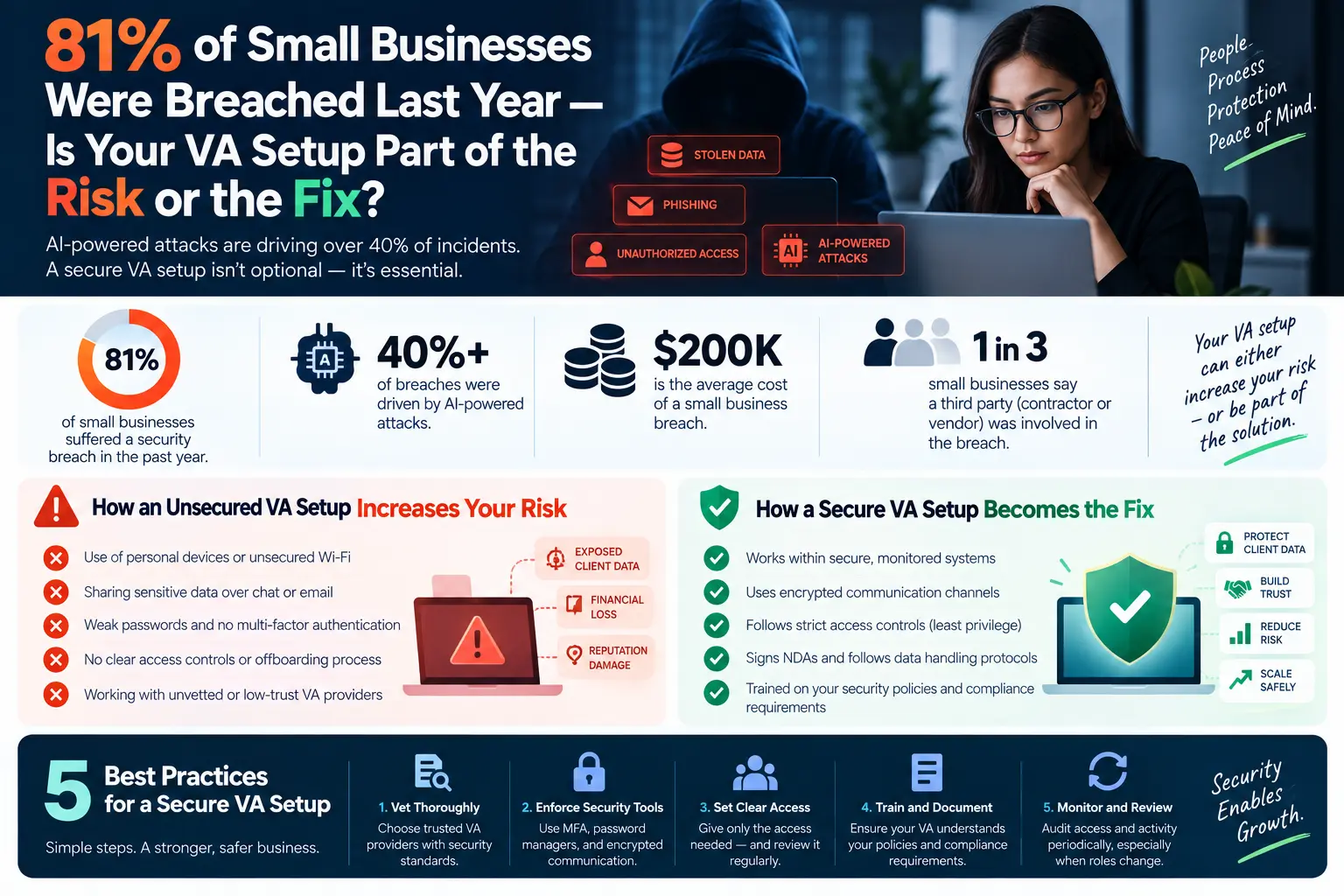
A virtual assistant is not automatically a cybersecurity risk. The real risk is an insecure setup: shared passwords, a founder-level login, access to more data than the work requires, unapproved apps, weak payment-verification rules, and credentials that remain active after a role changes. A secure VA setup does the opposite. It gives one trained person named, limited access and a repeatable checklist for account hygiene, suspicious-message escalation, access reviews, and offboarding.
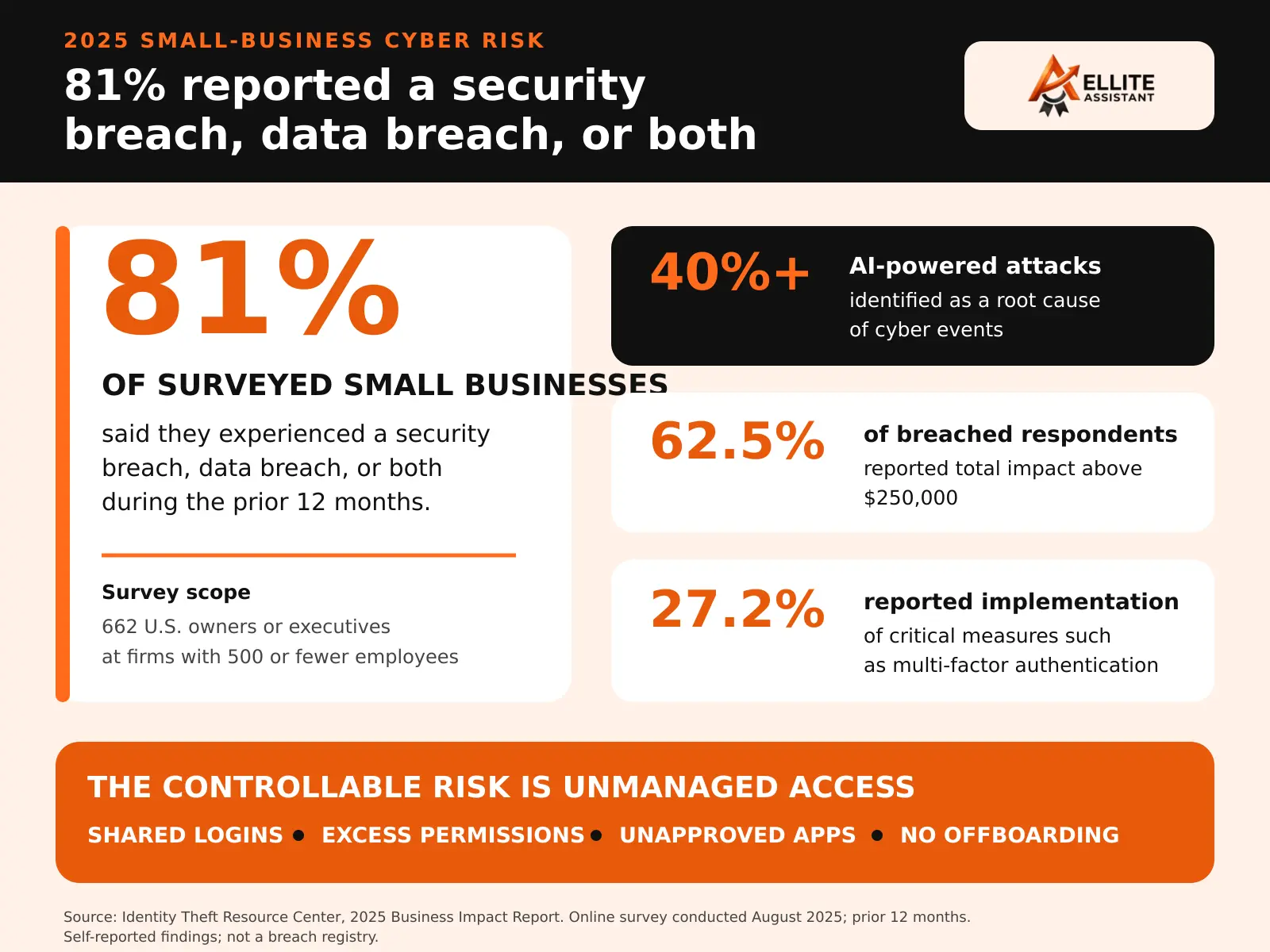
That distinction matters for U.S. small businesses. The Identity Theft Resource Center’s 2025 Business Impact Report found that 81% of surveyed small businesses reported suffering a security breach, data breach, or both during the prior 12 months. Respondents identified AI-powered attacks as a root cause in more than 40% of cyber events. The fix is not to avoid remote support. It is to treat every employee, contractor, vendor, and VA account as a controlled business identity—not as an informal favor granted through a shared login.
A capable virtual assistant can help operate the control layer: maintaining an access register, following approved data-handling procedures, checking that routine access reviews happen, documenting exceptions, and escalating suspicious activity quickly. Your owner, IT provider, cybersecurity professional, attorney, insurer, or compliance lead must still set the standards and make high-stakes decisions. No VA company, security product, or checklist can guarantee that a breach will not occur.
What the 81% small-business breach statistic actually means
The ITRC’s headline is alarming, and it deserves context. Its 2025 report surveyed owners and executives in August 2025 about the previous 12 months. Eighty-one percent said their organization had suffered a security breach, data breach, or both. More than 40% identified an AI-powered attack as a root cause of a cyber event.
The same report found a gap between concern and controls. The share of leaders who felt “very prepared” for an attack fell from 56.5% in 2024 to 38.4% in 2025, while reported implementation of critical measures such as multi-factor authentication declined from 33.6% to 27.2%. Among breached businesses, 62.5% reported a total financial impact above $250,000, including lost revenue, remediation costs, and fines.
These numbers do not prove that a remote worker caused the problem. They show that small firms operate in a hostile environment where ordinary process gaps can become expensive. AI can help criminals produce more convincing impersonation, phishing, and social-engineering attempts at greater speed. At the same time, a rushed team may grant broad access simply because setting up roles and approvals feels slower than sharing the owner’s password.
That shortcut is the part a business can control. The Federal Trade Commission advises companies to restrict vendor access to a need-to-know basis, use multi-factor authentication, secure remote connections, put security expectations in contracts, and verify that vendors follow the rules. NIST’s Cybersecurity Framework 2.0 Small Business Quick-Start Guide gives smaller organizations a practical way to begin managing risk even when they do not have a mature security program.
How a virtual assistant setup becomes part of the risk
Most unsafe VA arrangements do not begin with malicious intent. They begin with convenience. The owner wants help now, the software’s permission settings are unfamiliar, and sending a password feels like the fastest route. As the assistant proves useful, access expands. Six months later, no one can say exactly which systems, folders, integrations, exports, or recovery methods are still available.
1. The assistant uses the founder’s login
A shared identity destroys accountability. The system log may show that “the owner” exported a list, changed a forwarding rule, or approved a payment, even when someone else used the account. It also makes offboarding disruptive because changing the password can break integrations and sign out the real owner. Create a named account whenever the platform supports it.
2. The role has blanket administrator access
Administrative rights may permit user creation, exports, billing changes, data deletion, app installation, security-setting changes, or ownership transfer. Most routine admin work does not require those powers. NIST defines least privilege as restricting a user to the minimum resources and authorizations required for the assigned task.
3. Passwords travel through email, chat, or a spreadsheet
Copying credentials into an ordinary message creates persistent copies that are difficult to track or revoke. Use a business password manager when a system cannot provide separate user accounts. Where possible, share access without revealing the underlying password, require MFA, and keep the recovery method under company control.
4. Business information leaks into personal or unapproved tools
A remote assistant may move a customer list into personal cloud storage, forward a message to a personal email address, download invoices locally, or paste confidential material into an unapproved AI tool because the policy was never stated. The solution is not “be careful.” Name the approved systems, prohibited data, retention rule, and escalation route.
5. Sensitive actions lack a second check
A polished message asking to change bank details, reset an account, purchase gift cards, send payroll data, or release a customer export may look legitimate—especially when AI helps an attacker imitate tone and context. High-impact actions need an independent verification step using a known channel, not a reply to the incoming request.
6. Access survives the work
Projects end, responsibilities shift, integrations remain connected, and active sessions stay open. A resignation email is not an offboarding control. Someone must disable accounts, revoke sessions and tokens, remove vault and folder permissions, transfer ownership, rotate any necessarily shared secret, and record completion.
For the broader legal, contractual, and cross-border issues behind these controls, use Ellite Assistant’s detailed guide to data security and compliance when outsourcing to a virtual assistant. This article focuses on the operating setup a U.S. owner can examine immediately.
Is your VA setup part of the risk or part of the fix?
Use the table below as a fast diagnostic. A business does not become secure simply because it can check one or two boxes. The goal is a consistent system in which access, data, decisions, monitoring, and departure are all controlled.
| Control area | Risk setup | Fix-oriented setup |
|---|---|---|
| Identity | Founder or team login is shared | Every person has a named account |
| Permissions | Admin access is granted “just in case” | Role is limited to the task and reviewed |
| Authentication | Password alone; recovery goes to a personal device | MFA is required; company controls recovery |
| Data handling | Personal email, local downloads, and any AI tool are allowed | Approved systems and prohibited data are documented |
| High-risk actions | One person can receive and complete a sensitive request | Independent verification and approval thresholds apply |
| Monitoring | No access list, review date, or exception log | Access register, logs, alerts, and recurring reviews exist |
| Offboarding | Owner assumes passwords were deleted | Accounts, sessions, tokens, vaults, and files are checked |
If the right-hand column describes your operation, a VA can become part of the defense by keeping routine controls visible and completed. If the left-hand column dominates, hiring another person adds another path into systems that were already poorly governed.
This same risk-based thinking applies to every workflow. Ellite’s guide to deciding what to automate, delegate, or keep with the owner can help separate routine execution from decisions that still require authority.
Use the LOCKED framework for safer VA access
LOCKED is a six-part operating model for remote assistant security. It is deliberately simple enough to use during onboarding, monthly access reviews, role changes, and offboarding.
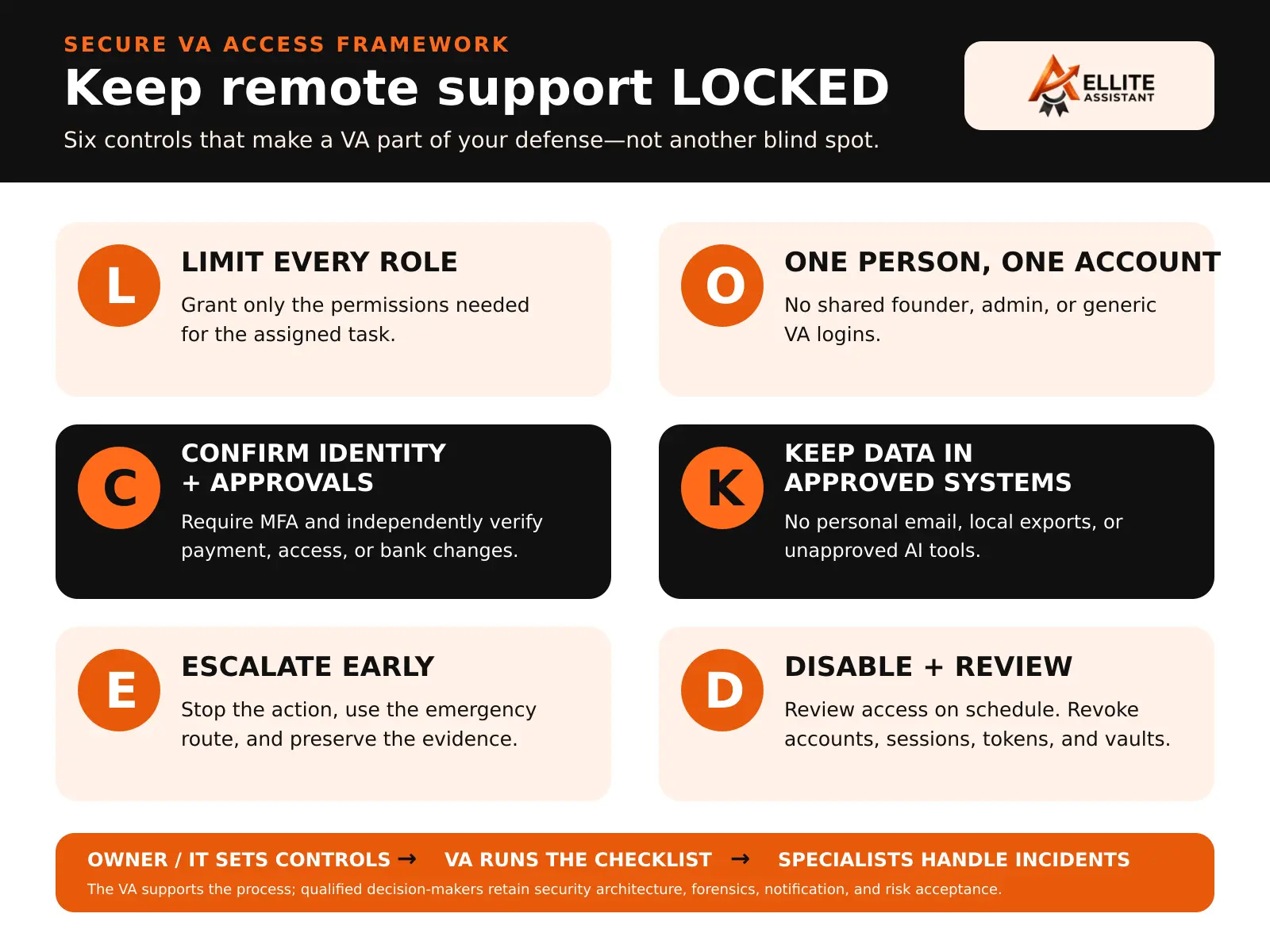
L — Limit every role
Begin with the task, not the software. If the work is to label incoming support messages, grant access to the required queue—not every mailbox, billing settings, user administration, and historical customer export. Write down what the VA may view, edit, export, delete, send, or approve.
O — One person, one account
Individual identities create a usable audit trail. Do not create a generic “VA” account that multiple people reuse. If a backup assistant needs access, give that person a separate account with the same approved role and record who authorized it.
C — Confirm identity and approvals
Require MFA and define how unusual requests are verified. A request to change payment details should be confirmed through a known phone number or a separate established channel. The requester and approver should not be verified only through the message that initiated the change.
K — Keep data in approved systems
Specify where customer, employee, financial, and confidential business information may live. Prohibit personal email, personal cloud drives, unsanctioned browser extensions, and unapproved AI tools. Use fictional or redacted records for training whenever possible.
E — Escalate early
The safest assistant is not the one who silently “handles everything.” It is the one who recognizes the boundary, stops a risky action, and reports it through a tested route. Define urgent triggers: unexpected MFA prompts, new forwarding rules, mass downloads, password resets, changed bank details, suspicious links, lost devices, or messages sent to the wrong recipient.
D — Disable access and review regularly
Set a review date when access is granted. Revisit permissions when responsibilities change, not only when the relationship ends. At offboarding, disable accounts and active sessions, revoke API tokens and connected apps, remove password-vault and folder access, transfer file ownership, and confirm completion with each system owner.
What a VA can own, support, and never decide alone
Security work fails when every activity is labeled “IT” or every task is handed to an assistant. Use three responsibility levels.
| Level | Examples | Required oversight |
|---|---|---|
| VA can own the routine | Maintain the access register; schedule reviews; track MFA enrollment; keep the approved-tool list; collect policy acknowledgments; organize training records; document access requests; run the offboarding checklist; maintain an incident contact sheet | Written SOP, named owner, and exception route |
| VA can prepare or coordinate | Request role-based accounts; gather vendor-security answers; prepare a data inventory; flag dormant users; collect evidence for an access review; document an incident timeline; test that contact routes work | System owner, IT provider, compliance lead, or manager validates and approves |
| Business or specialist retains | Security architecture; admin and recovery-key custody; risk acceptance; forensics; breach determination; regulator or customer notification; insurance representations; legal conclusions; final payment approval | Authorized owner and appropriately qualified professionals |
A clear matrix protects both sides. The owner knows what has been delegated. The assistant knows when stopping and escalating is the correct performance—not a failure to be proactive. If you are comparing providers, review how Ellite matches and onboards a dedicated virtual assistant for a defined workflow, then ask how those practices will apply to your specific systems and data.
What secure VA access looks like in common small-business workflows
Email and calendar management
Use delegated mailbox access or an individual account instead of sharing the owner’s password. Limit permission to the mailboxes and calendars required. Block settings changes where possible. Define which messages may be drafted, which may be sent, and which must be escalated. Alert on new forwarding rules and unusual sign-ins. Bank changes, password resets, legal notices, threats, and high-value commitments should follow a separate approval path.
CRM and customer support
Create a standard user role limited to assigned records or queues. Restrict bulk export, deletion, user management, integrations, and billing. Use approved response templates, identity-verification steps, and refund thresholds. The VA may resolve ordinary cases within the policy; sensitive complaints, account takeovers, large refunds, chargebacks, or data-rights requests must escalate.
Bookkeeping and payments
Separate preparation from approval. A VA can organize receipts, prepare reconciliation questions, create draft invoices, and follow up on approved receivables. They should not receive a bank-detail change and approve the same change alone. Use role-based accounting access, payment limits, dual authorization, and independent verification. Ellite’s bookkeeping virtual assistant service describes appropriate routine support while reserving tax, audit, and professional accounting judgments for qualified professionals.
Healthcare and other regulated work
Do not assume that an NDA makes a workflow compliant. Determine whether HIPAA, the FTC Safeguards Rule, state privacy or breach laws, contractual obligations, or other sector rules apply. Confirm the required agreement, approved environment, training, access controls, audit logs, device standards, and incident process before protected information is available. Review the defined scope of healthcare virtual assistant support and have qualified counsel or compliance professionals validate your actual arrangement.
AI-assisted research, content, and administration
Maintain an approved AI-tool list and a “never paste” data list. Customer records, credentials, employee files, protected health information, unpublished financials, contracts, and confidential client material should not enter a tool unless your business has specifically evaluated and authorized that use. A VA can redact inputs, use approved templates, fact-check drafts, and keep a review log. The business retains responsibility for the source data, tool selection, privacy settings, and final high-impact output.
Ten security questions to ask before hiring a virtual assistant
Do not ask only, “Do you keep data secure?” A yes-or-no answer reveals very little. Ask for the operating details that will affect your account.
- Will every person use a named account? Ask how backup coverage works without shared identities.
- How are credentials shared and stored? Look for a business password manager, MFA, and company-controlled recovery.
- What device and workspace requirements apply? Clarify updates, encryption, screen locking, malware protection, household access, and public Wi-Fi.
- Which people or subcontractors can access my work? Get names or defined roles, locations, purposes, and approval rules.
- Can my data enter personal email, local storage, browser extensions, or AI tools? The answer should match a written policy and your instructions.
- How are permissions requested, approved, reviewed, and removed? Ask to see the process, not confidential records from another client.
- What counts as a security incident? The definition should include mistakes, lost devices, suspicious prompts, wrong-recipient messages, and unauthorized access—not only confirmed hacking.
- How quickly will I be told about a suspected incident? Your internal escalation deadline should leave time for professional assessment and any legal obligations.
- What evidence can I review? Examples include training completion, access-review records, policy acknowledgments, and offboarding confirmation.
- Who makes the final security and compliance decisions? A responsible provider will not pretend that a VA replaces your IT, legal, insurance, or compliance professionals.
Red flags include requests for your master password through email or chat, vague claims of being “100% breach-proof,” resistance to individual accounts, unrestricted access “for convenience,” no written incident route, and no explanation of what happens to data and access when the work ends.
A 30-day plan to make your VA setup safer
Days 1–5: inventory people, systems, and data
- List every employee, VA, contractor, agency, and integration with access.
- Record the system, account name, role, MFA status, data involved, approver, and review date.
- Identify shared passwords, generic users, personal accounts, former workers, and unknown integrations.
- Rank systems by impact: email, identity provider, banking, payroll, accounting, CRM, cloud storage, website, and customer platforms usually deserve early attention.
Days 6–10: close the obvious access gaps
- Create named accounts and remove unnecessary admin privileges.
- Enable MFA, beginning with email, identity, finance, cloud storage, and remote access.
- Move unavoidable shared secrets into a managed business vault.
- Disable stale users, active sessions, forwarding rules, tokens, and connected apps after verifying business impact.
Days 11–17: write three short operating rules
- Data rule: what the assistant may view, copy, download, retain, and enter into AI tools.
- Approval rule: which actions require a second person or independent verification.
- Incident rule: what to stop, who to contact, how fast to report, and what evidence to preserve.
Days 18–23: test normal work and two exceptions
Run one ordinary task from start to finish. Then simulate a suspicious bank-detail change and an unexpected MFA prompt. The objective is not to trick the VA. It is to see whether the written process produces the right stop, verification, escalation, and record.
Days 24–30: review evidence and assign the next date
- Confirm that logs identify the correct user.
- Remove any access that was not used.
- Correct unclear SOP steps and approval thresholds.
- Schedule the next access review based on risk.
- Make one person accountable for maintaining the register and chasing overdue actions.
What a VA should do when something looks wrong
The first response should be simple enough to remember under pressure. Your exact plan must come from your IT, security, legal, insurance, and compliance requirements, but a VA-facing procedure commonly includes:
- Stop the risky action. Do not approve the change, open another attachment, continue a transfer, or send more data.
- Use the emergency route. Notify the named contact through a known channel rather than replying to the suspicious message.
- Preserve evidence. Keep the message, headers, URL, screenshot, timestamp, device details, and relevant logs. Do not “clean up” unless the response lead instructs it.
- Contain only within authority. The VA may be authorized to sign out, disconnect a device, or pause a workflow. Broader action belongs to the incident lead.
- Document facts, not conclusions. Record what was observed and done. Do not announce a breach, accuse a person, contact customers, or make legal statements without authorization.
The FTC advises businesses facing ransomware or a serious incident to limit damage, involve experienced IT or cybersecurity personnel, investigate, contact appropriate authorities and regulators, and use an established continuity plan. The assistant’s highest-value contribution is often rapid recognition, clean escalation, and an accurate timeline—not amateur forensics.
How to measure whether your VA setup is becoming safer
“No breach this month” is not enough evidence. Track leading indicators that show whether the controls are actually operating.
| Measure | Healthy direction | Owner |
|---|---|---|
| Named-account coverage | Toward 100% of human users | System owner |
| MFA coverage on eligible sensitive accounts | Toward 100% | IT or system owner; VA tracks |
| Overdue access reviews | Toward zero | Business owner; VA coordinates |
| Shared or unmanaged credentials | Toward zero | System owner |
| Time to report a suspicious event | Shorter and within policy | All users |
| Offboarding completed by deadline | Toward 100% | Manager and system owners |
| Unapproved storage or AI-tool events | Toward zero, with reporting encouraged | Workflow owner |
Do not punish people for raising good-faith concerns. A falling incident count can mean controls improved—or that staff stopped reporting. Pair the numbers with spot checks, short simulations, and conversations about where the workflow still invites shortcuts.
Frequently asked questions
Is it safe to give a virtual assistant access to business systems?
It can be, when access is named, limited, protected by MFA, appropriately monitored, supported by written procedures, and removed promptly when no longer needed. The risk depends on the data, device, system, person, provider, permissions, and controls—not the VA job title alone.
Should a VA have access to my main email account?
Avoid sharing the owner’s password. Use delegated mailbox access or a named user with only the required permissions. Define send, delete, forwarding, settings, and escalation rules. Protect the account with MFA and monitor unusual logins or rule changes.
What is the safest way to share passwords with a remote assistant?
Prefer separate user accounts. If a platform cannot provide them, use a managed business password manager instead of email, chat, documents, or spreadsheets. Require MFA where available, keep recovery under company control, and revoke vault access during offboarding.
Is an NDA enough to protect my business data?
No. An NDA can create confidentiality duties, but it does not replace access controls, authentication, secure devices, data-handling instructions, monitoring, incident response, offboarding, or any contract terms required by applicable privacy and sector rules.
Can a virtual assistant manage cybersecurity for a small business?
A trained VA can coordinate routine security administration—such as access records, review reminders, policy acknowledgments, tool inventories, and incident documentation—within an approved SOP. A VA should not replace a qualified IT or cybersecurity professional or independently decide architecture, forensics, breach notification, compliance, or risk acceptance.
How often should VA access be reviewed?
Review it whenever the role, project, system, risk, or personnel changes and on a recurring schedule appropriate to the impact. High-risk finance, identity, health, customer-data, or administrator access may warrant more frequent review than a low-risk project folder. Every permission should have an owner and an end condition.
What should I do first if I suspect a VA account is compromised?
Use your incident-response plan immediately. Notify the designated internal and technical contacts through a known channel, preserve evidence, and contain access only as authorized. Involve qualified security and legal professionals as appropriate; do not let an assistant investigate or communicate externally without direction.
Sources and methodology
- Identity Theft Resource Center, 2025 Business Impact Report summary and survey methodology
- Federal Trade Commission, Cybersecurity for Small Business
- Federal Trade Commission, Start with Security: A Guide for Business
- NIST SP 1300, Cybersecurity Framework 2.0: Small Business Quick-Start Guide
- NIST Computer Security Resource Center, least privilege definition
Test support without handing over the keys
Start Ellite Assistant’s $49 trial with five hours over seven days. Choose one real, lower-risk workflow, define the access boundary, and see how a dedicated VA follows your process before you expand the scope.
View the $49 VA TrialSecurity statistics, public guidance, and Ellite Assistant’s pricing page were checked on September 8, 2026. Research, threats, rates, and laws can change, and individual risk varies. This article provides general business information, not legal, cybersecurity, compliance, insurance, tax, employment, or financial advice.
Is it safe to give a virtual assistant access to business systems?
- How much does it cost to set up secure VA access?
- What is the difference between a VA and a cybersecurity professional?
- Should I use a password manager for my virtual assistant?
- How often should I review VA access permissions?
- What is least privilege access for remote workers?
- Can a VA handle HIPAA-compliant work?
- What are the red flags when hiring a VA provider?
- How do I offboard a virtual assistant securely?
- What is multi-factor authentication and why does it matter?
- Should VAs use personal devices for work?
- What data should never enter AI tools?
- How do I create an access register for my business?
- What is an incident response plan for small businesses?
- Can I use shared logins for convenience with a VA?
- What security questions should I ask before hiring a VA?