Who Checks the AI? A Human-in-the-Loop Workflow for Small Businesses
A human-in-the-loop AI workflow helps small businesses use AI without allowing unchecked drafts to become business decisions. AI can prepare content, organize information and recommend actions, but a named person must verify facts, context, risks and permissions. Routine work may be handled by a trained operator or Virtual Assistant, customer-facing outputs require review by a process owner, and legal, financial, employment, safety or other high-consequence decisions must remain with an authorized owner or qualified professional. The article introduces three risk-based approval lanes and the five-step CHECK framework for consistent AI oversight.
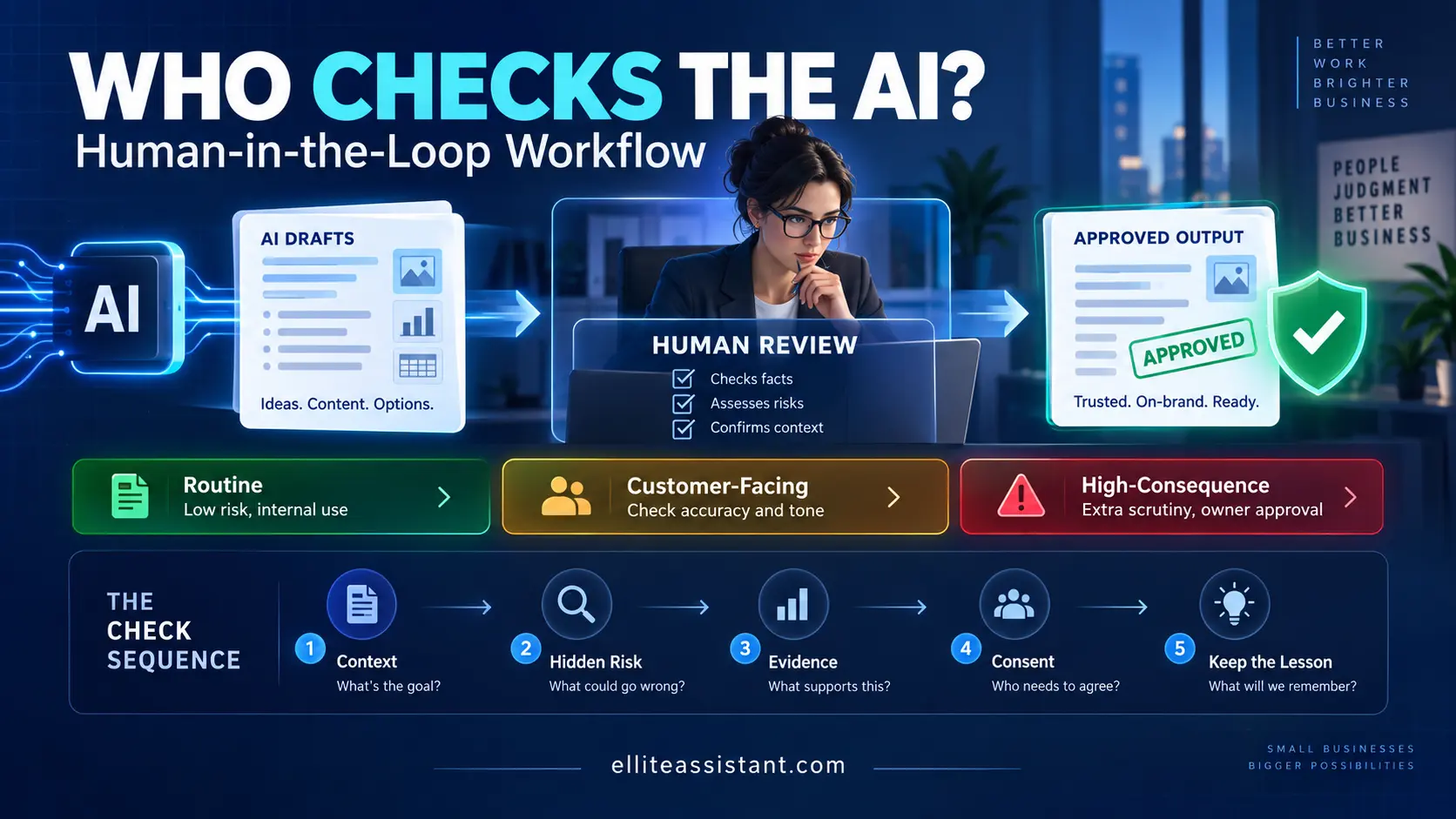
A human-in-the-loop AI workflow is a documented process in which AI prepares or recommends work, a named person checks the relevant facts and risks, and the correct decision owner approves the result before it creates a meaningful consequence. For a small business, that can be as simple as one reviewer, three risk levels and a five-step checklist—not an enterprise AI committee.
The person checking the AI should be close enough to the work to recognize a bad answer and authorized enough to stop it. A trained Virtual Assistant can own routine quality control, source checks, exception tracking and approval routing. The founder or qualified professional should retain final decisions involving contracts, pricing exceptions, hiring, legal or financial judgment, safety, sensitive access and promises the business must keep.
The goal is not to slow AI down. It is to stop a fast draft from masquerading as a finished decision. If your team is already combining people and tools, Ellite’s guide to an AI-augmented Virtual Assistant with human review explains the broader operating model.
In this guide
- The quick answer
- The founder’s real AI problem
- What human-in-the-loop means
- Where AI-assisted work fails
- Three approval lanes
- The CHECK workflow
- Build an AI task card
- What review looks like by task
- What a VA can own
- Protect data and access
- A 30-day rollout
- Metrics that reveal quality
- Common implementation mistakes
- Frequently asked questions
Who should check AI-generated work in a small business?
Assign the checker according to the consequence of the task. The person who understands the approved source and customer context can review routine work. The person who owns the legal, financial, employment, safety or reputational consequence must approve higher-risk work.
| Role | What that person checks | What that person should not assume |
|---|---|---|
| Task operator or VA | Inputs, approved sources, completeness, obvious factual conflicts, tone, formatting and the required checklist. | That a polished answer is correct or that silence from the owner equals approval. |
| Process owner | Whether the workflow followed the SOP, exceptions were routed and the output is fit for the intended use. | That one good test proves the process will remain reliable. |
| Decision owner | Consequential promises, pricing, policy, contracts, people decisions, regulated issues and strategic tradeoffs. | That the reviewer or AI has authority to make the final decision. |
| Qualified professional | Legal, tax, accounting, medical, cybersecurity, employment or industry-specific judgments within their scope. | That a general administrative review replaces professional advice. |
The founder’s real AI problem is not adoption—it is ownership
Picture a familiar, fictional scenario. At 10:42 p.m., Maria, the owner of a 12-person commercial cleaning company, asks an AI tool to turn her notes into a client-renewal proposal. The draft is clear, confident and ready in seconds. It also uses an old price, promises a response window her team never approved and describes a service the client did not request.
Maria catches two of the three problems before sending it. She misses the third because the document looks finished. The next morning, the customer asks the operations manager to honor the promise.
The lesson is not that Maria should stop using AI. The tool removed a blank page and gave her a useful first pass. The problem is that the business had no defined source, reviewer or approval gate. Maria became the backup checker simply because she was the person still awake.
That pattern appears across owner-led companies:
- A salesperson uses AI to personalize outreach but nobody verifies the prospect facts.
- A support agent accepts an AI reply that sounds empathetic but promises a refund outside policy.
- A marketing assistant publishes a statistic without opening the cited source.
- A manager summarizes an employee conversation and treats the summary as a complete record.
- A founder asks AI to compare vendors but never checks whether the comparison used current plans.
Each output may save drafting time. Each can also create new work: corrections, apologies, reopened tickets, pricing confusion or a decision based on a fact that was never true. The hidden cost is not simply “AI error.” It is uncertainty with no owner.
Entrepreneur’s view: You do not need to personally inspect every sentence. You need confidence that the right person checked the right thing before your name, money or customer relationship was attached to it.What does human-in-the-loop actually mean?
Human-in-the-loop means a person has a purposeful, documented role inside the AI-assisted process. The person is not present merely to make the workflow sound responsible. They have access to the source information, know what to check, can pause the process and understand where the decision goes next.
The NIST AI Risk Management Framework is voluntary and designed for organizations of different sizes and sectors. It organizes AI risk work around Govern, Map, Measure and Manage. NIST also emphasizes that organizations need accountability mechanisms plus defined roles and responsibilities; a framework alone does not create those behaviors.
NIST’s AI RMF Playbook guidance on human-AI oversight makes the operational point even clearer: distinguish people using an AI system from people overseeing it, define their responsibilities and track outcomes. A five-person company may implement that differently from a bank, but the underlying question is the same: who may use the tool, who checks the work and who has release authority?
Human review is more than proofreading
Proofreading catches spelling and style. Human oversight also asks:
- Was this the correct task to give AI?
- Were the inputs allowed and necessary?
- Did the output use the approved source of truth?
- Could the answer harm a customer, employee or business relationship?
- Is the person reviewing it qualified to judge the risk?
- Who may approve, send, publish, pay, deny or commit?
- What happens when the reviewer is uncertain?
A human-in-the-loop process can still be fast. Low-risk work can use templates and sample-based checks. Customer-facing work can receive a short pre-send review. High-consequence decisions can move to the owner or qualified professional. The amount of review should increase with the cost of being wrong.
Five ways AI-assisted work fails after the prompt
Many teams focus on better prompts. Prompt quality matters, but a strong prompt does not replace a control system. The failure often occurs after the tool produces a plausible answer.
1. The confident falsehood
NIST’s Generative AI Profile uses the term “confabulation” for confidently presented erroneous or false content. It recommends reviewing and verifying sources and citations during testing and ongoing monitoring. In ordinary business terms: open the source. A believable citation, price, product feature or policy statement is not evidence by itself.
2. The correct fact in the wrong context
An answer can be factually accurate and still be unusable. A discount may apply only to annual billing. A delivery window may apply to one ZIP code. A customer exception may have expired. The reviewer needs business context, not only general knowledge.
3. The quiet commitment
AI-generated language can convert an idea into a promise: “We will waive the fee,” “Your request is approved,” “We guarantee results” or “A technician will arrive today.” If the person sending the message lacks that authority, good grammar makes the risk harder to notice.
4. The sensitive input
The mistake can happen before an output exists. An employee pastes a customer record, bank detail, health note, contract or unpublished strategy into an unapproved tool. The resulting draft may look harmless while the input choice created the real risk.
5. The process that never learns
A reviewer fixes the same error every week but never records it. The team celebrates time saved while repeating the same correction. Human-in-the-loop becomes permanent cleanup instead of a feedback system. A mature workflow turns recurring corrections into better source data, instructions, templates and boundaries.
Use three approval lanes instead of one rule for everything
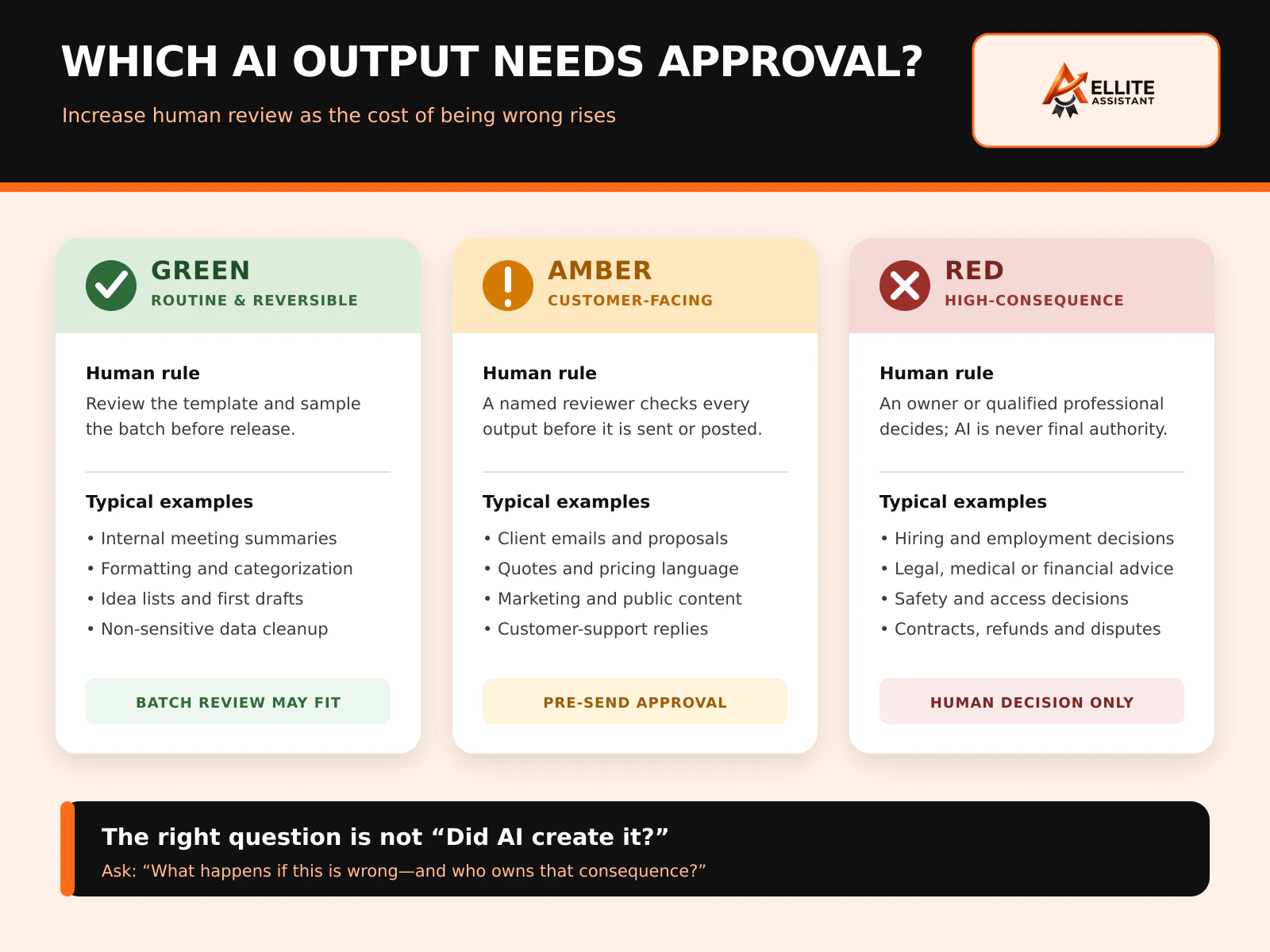
“A human must review all AI” sounds safe but often becomes meaningless. Teams either review so much that AI saves no time or review so casually that the check becomes a click. Risk lanes tell people how much review is required and who can release the output.
| Lane | Typical work | Required human control | Release authority |
|---|---|---|---|
| Green: routine and reversible | Formatting, categorization, internal idea lists, meeting-summary drafts and non-sensitive cleanup. | Approved template, source check and sample review of repeated batches. | Trained operator within the SOP. |
| Amber: customer-facing or reputation-sensitive | Client emails, proposals, quotes, marketing copy, support replies and public posts. | Named reviewer checks every output for facts, tone, pricing, promises and context before release. | Process owner or person with documented authority. |
| Red: high-consequence | Hiring, legal, tax, medical, financial, safety, access, contract, refund and material dispute decisions. | AI may organize information, but an owner or qualified professional evaluates and decides. | Authorized decision owner only. |
Classify the use—not the tool
The same AI tool may sit in all three lanes. Drafting an internal agenda is different from drafting a termination letter. Summarizing a public article is different from summarizing a confidential medical record. The risk belongs to the use case, data and consequence—not the logo on the software.
When a task spans lanes, use the stricter rule. A proposal may begin as routine formatting, become customer-facing when pricing is inserted and become high-consequence when it changes contractual terms. The workflow should identify the point where approval authority changes.
The CHECK loop: a human-in-the-loop workflow your team can remember
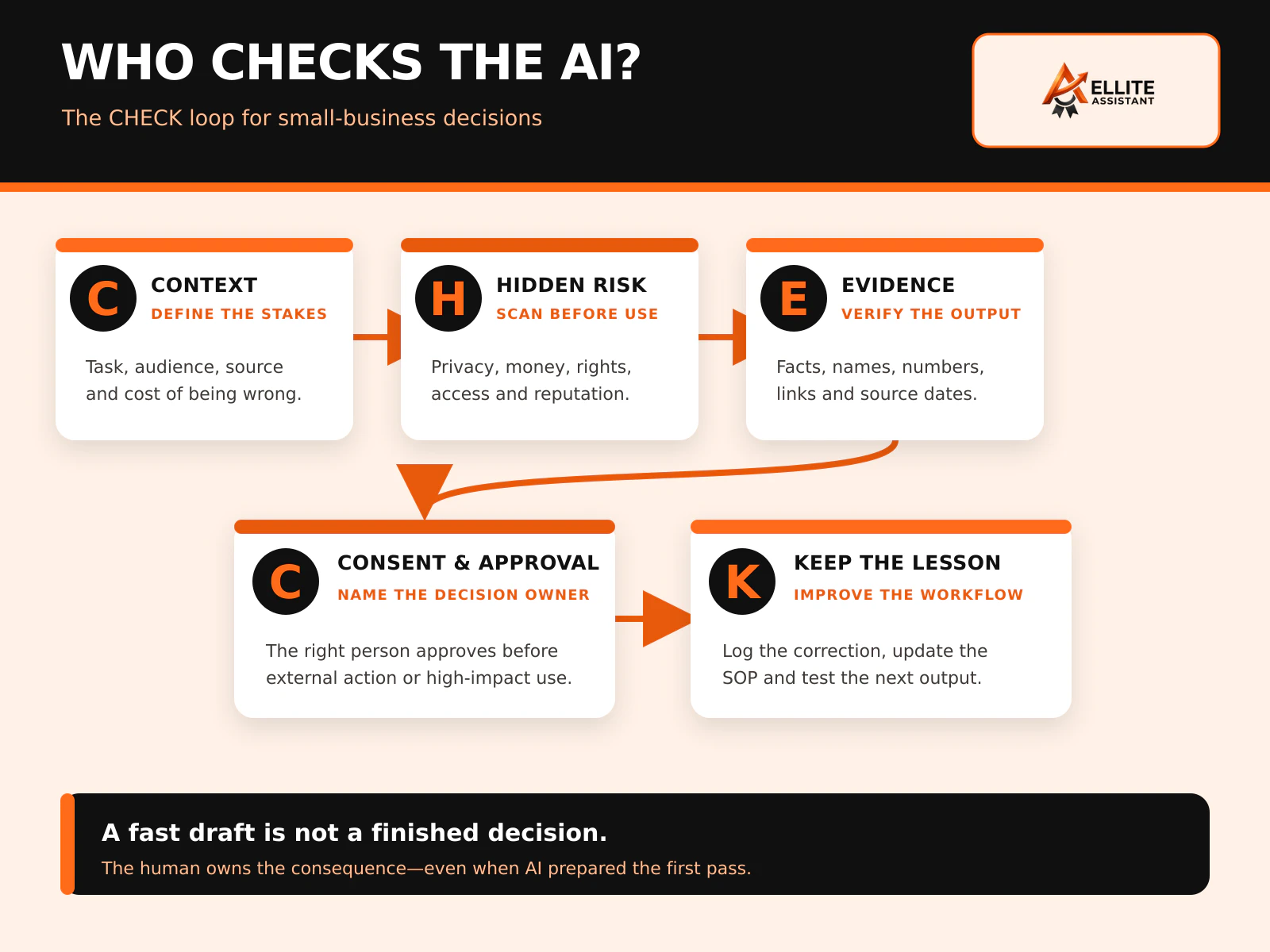
Use CHECK at the point where an AI draft becomes business work. The five steps are short enough for a checklist and specific enough to reveal who owns the decision.
C — Context and consequence
Define the task, audience, approved source and intended action. Ask what happens if the result is wrong. An internal brainstorming note and a client proposal should not enter the same workflow.
H — Hidden-risk scan
Check whether the task touches confidential data, payment information, employment, protected characteristics, safety, account access, professional advice, public claims or material commitments. If the reviewer cannot evaluate the risk, route it to someone who can.
E — Evidence check
Compare facts, names, dates, prices, calculations, links, citations and policy language with the approved source. Do not ask the AI to verify itself. The reviewer should be able to point to the record that supports the final output.
C — Consent and approval
Confirm that the person affected or the business owner has provided any required authorization and that the named decision owner has approved the release. “The founder was copied” is not the same as approval. Use a clear status such as approved, changes required or escalated.
K — Keep the lesson
Record what changed, why it changed and whether the SOP needs an update. If an old price keeps appearing, repair the source or template. If customer exceptions are common, add an escalation path. The purpose of human review is not to correct AI forever; it is to improve the whole system.
Build one AI task card before writing more prompts
A prompt tells the tool what to produce. An AI task card tells the business how that output may be used. Create one card for every recurring workflow, starting with the customer-facing task your team performs most often.
| Task-card field | Question to answer | Example |
|---|---|---|
| Business outcome | What useful result are we trying to create? | Prepare a first draft of a renewal email for review. |
| Allowed inputs | Which data and documents may be used? | Approved CRM fields, current service summary and published price sheet. |
| Prohibited inputs | What must never enter this tool or workflow? | Raw payment data, passwords, private employee notes and unrelated customer records. |
| Source of truth | Where does the reviewer verify claims? | Current signed agreement and version-controlled pricing page. |
| Risk lane | How costly would an error be? | Amber because the email is customer-facing and includes a renewal promise. |
| Required checks | What must a person verify every time? | Name, plan, price, dates, scope, tone, commitment and link destination. |
| Reviewer | Who performs the quality check? | Assigned operations VA. |
| Decision owner | Who may approve and release it? | Account manager; founder approval required for exceptions. |
| Escalation triggers | When must the workflow stop? | Price conflict, cancellation request, complaint, custom term or uncertain source. |
| Evidence and retention | What do we record and for how long? | Source links, reviewer, approval status, material correction and sent version. |
Keep the card short enough to use. A one-page operating instruction that people follow is more valuable than a 40-page policy nobody opens. Expand documentation where the risk, regulation or customer obligation justifies it.
What human review looks like across common small-business tasks
The reviewer should look for different failure modes in different departments. “Check for accuracy” is not specific enough.
| AI-assisted task | Human reviewer checks | Escalate when |
|---|---|---|
| Customer-support reply | Account context, policy, promised action, tone, dates and whether the customer’s real question was answered. | The customer disputes a charge, threatens action, raises safety concerns or requests an exception. |
| Sales email or proposal | Prospect facts, offer, scope, price, results claims, dates and authority to make each promise. | Custom terms, discounts, guarantees, regulated claims or contract language appear. |
| Marketing article or post | Sources, statistics, dates, quotations, customer permissions, brand voice and whether the claim can be supported. | The content covers legal, medical, financial or safety advice—or uses a claim the business cannot prove. |
| Meeting summary | Attendees, decisions, owners, deadlines and separation of stated facts from AI inference. | The summary becomes an employment, legal, compliance or disciplinary record. |
| CRM update | Correct contact, source, stage, consent status, next action and duplicate risk. | The system proposes deleting, merging or changing high-value records without clear evidence. |
| Invoice preparation | Customer, approved rate, quantity, tax handling, purchase order, service evidence and billing address. | There is a dispute, credit, refund, write-off, unusual tax treatment or contract conflict. |
| Candidate screening support | Job-related criteria, source accuracy, consistency, accessibility and applicable policy. | The AI output could determine who is hired, rejected, promoted, disciplined or paid. |
If customer communication is the first workflow, Ellite’s Customer Support Virtual Assistant service describes email, chat and ticket support that can operate under defined escalation and quality-control rules. For public content and campaign operations, a Marketing Virtual Assistant can coordinate drafting, source checks, approvals and publishing.
Can a Virtual Assistant become the human AI-management layer?
Yes—for the operational layer. A trained VA can become the named person who keeps routine AI-assisted work inside the business’s rules. That does not make the VA the legal, financial or strategic authority. It makes the VA the owner of a well-defined quality-control process.
A VA can own these repeatable controls
- Maintain the approved prompt, template and source library.
- Confirm that the request contains the required inputs.
- Remove or flag data that is not allowed in the selected tool.
- Compare names, prices, dates, claims and links against the source of truth.
- Apply the department-specific review checklist.
- Mark uncertainty instead of silently guessing.
- Route red-lane and exception items to the correct decision owner.
- Publish or send only after the required approval status is recorded.
- Track corrections, rejected drafts, escaped errors and recurring failure patterns.
- Update the SOP after the process owner approves a change.
The business should retain these decisions
- Which AI tools and data categories the company permits.
- Risk tolerance and classification of new use cases.
- Customer promises, special pricing, refunds and contractual exceptions.
- Employment, legal, tax, medical, security and safety judgments.
- Final brand position on sensitive or controversial issues.
- Response to a material incident, complaint or harmful outcome.
The strongest VA is not the person who says “the AI gave me this.” It is the person who can explain what source they checked, what they changed, what remains uncertain and whose approval is required.
When the workflow is ready, Ellite can help you match a dedicated VA to the process and review responsibilities. Begin with one use case and a restricted permission set rather than giving a new assistant access to every tool and record.
Human oversight starts before anyone pastes data into AI
A reviewer cannot undo every data exposure after the fact. The task card should identify which tool is approved, which account must be used, which inputs are permitted, whether provider settings meet the company’s needs and how outputs are retained. Recheck vendor terms and controls because products change.
The FTC’s cybersecurity guidance for small businesses recommends limiting access to sensitive information on a need-to-know basis and only for the time a vendor needs it, along with strong encryption and other safeguards. Apply the same discipline to AI-assisted workflows and the people reviewing them.
Minimum controls for an AI reviewer or VA
- Individual business accounts; no shared founder login.
- Multi-factor authentication and an approved password manager.
- Least-privilege access to the source systems required for the task.
- Written rules for customer, employee, payment, health, contract and authentication data.
- A prohibited-data list beside the prompt or task card.
- Approved storage, file-transfer, retention and deletion methods.
- Separate permissions to prepare, approve and release sensitive work.
- A clear incident route if data is entered into the wrong tool or an output causes harm.
- A same-day access-revocation process when the role changes or ends.
“Do not paste confidential data” is too broad to be useful. Name the categories and show examples. A customer’s public company name may be allowed; a private contract, payment card or password may not be. The business should confirm the actual requirements for its industry, jurisdiction and vendor agreements.
How to build a human-in-the-loop AI workflow in 30 days
Start with one repeated workflow that already has a clear source of truth. Avoid the most regulated or consequential process as your first pilot.
Week 1: inventory and classify
- List where the team currently uses AI, including unofficial use.
- Choose one workflow with enough volume to measure.
- Assign it to the green, amber or red lane.
- Name the operator, reviewer, decision owner and backup.
- Record the current review time, corrections and complaints.
Week 2: build and test the task card
- Define allowed inputs, prohibited data and the source of truth.
- Create the CHECK checklist and escalation triggers.
- Test normal, incomplete, conflicting and unusual examples.
- Include at least one case where the correct action is to stop.
- Use fictional or appropriately controlled data during training where practical.
Week 3: run a controlled queue
- Process a limited batch with every output visibly marked as draft, approved, rejected or escalated.
- Require the reviewer to identify the supporting source.
- Audit all high-risk items and a meaningful sample of routine work.
- Hold a short review of exceptions rather than rereading every successful item in a meeting.
Week 4: measure and improve
- Compare review time, first-pass acceptance and escaped errors with the baseline.
- Identify corrections that should become source or SOP changes.
- Check whether the founder’s approval queue became smaller or merely moved.
- Decide whether to expand, hold, narrow or stop the workflow.
- Schedule the next review date; do not treat one successful month as permanent proof.
Measure whether human review improves work—not whether people look busy
Human oversight creates value when it prevents meaningful errors, shortens rework and makes approval clearer. Track a small set of measures with precise definitions.
| Metric | Definition | What it reveals |
|---|---|---|
| First-pass acceptance | Percentage of outputs approved without a material correction. | Whether inputs, sources and instructions are producing usable drafts. |
| Material correction rate | Percentage changed for facts, price, policy, promise, privacy, safety or authority—not cosmetic style. | Where the workflow is creating real risk or rework. |
| Escaped-error count | Material errors discovered after a message, record, post or decision was released. | Whether the approval gate is catching what matters. |
| Median review time | Time from AI draft ready to approval, rejection or escalation. | Whether the check is proportionate or has become a bottleneck. |
| Source completeness | Percentage of reviewed outputs with the required source or supporting record attached. | Whether reviewers can verify instead of guessing. |
| Escalation quality | Percentage of escalations containing the issue, source conflict, requested decision and deadline. | Whether the founder receives decisions instead of vague problems. |
| Repeat-error rate | Frequency of the same material correction after the SOP was updated. | Whether the workflow actually learns. |
Avoid a misleading target of zero corrections. Early corrections can mean the reviewer is doing the job. The better goal is fewer repeated material errors, faster resolution of genuine exceptions and no silent release of work outside the business’s authority.
Six human-in-the-loop mistakes that give founders false confidence
1. “Please review” is the entire SOP
The reviewer does not know whether to check grammar, facts, policy, permission or all four. Replace the vague instruction with task-specific checks.
2. The reviewer has no source of truth
A person cannot verify current pricing if three conflicting sheets exist. Fix the source system before judging the reviewer.
3. The founder remains the approval inbox
Every draft still waits for the owner, even when department leads already have authority. Define approval thresholds so routine work moves and genuine exceptions reach the founder.
4. The human becomes a rubber stamp
High volume, time pressure and polished outputs encourage automatic approval. Use random audits, visible material-change fields and a reasonable batch size.
5. The team reviews only the answer
Nobody asks whether sensitive information belonged in the prompt or whether AI was appropriate for the task. Review the full workflow: input, tool, output, action and feedback.
6. Corrections disappear
People silently repair drafts and move on. The same failure returns because the template, source or rule never changes. Make “Keep the lesson” a required closeout step for material corrections.
A useful test: Ask the reviewer to explain the last AI output they rejected. A healthy process makes stopping visible and acceptable.How to choose the right human reviewer
The best reviewer is not automatically the person with the most senior title or the most AI enthusiasm. Look for five qualities:
- Source knowledge: They know where the approved facts, prices, policies and records live.
- Healthy skepticism: They can challenge a confident output without rejecting useful automation.
- Boundary judgment: They understand when they may correct, when they may approve and when they must escalate.
- Clear communication: Their escalation states the issue, evidence, requested decision and deadline.
- Process discipline: They record material changes and improve the workflow instead of relying on memory.
Test candidates with a realistic fictional batch: one correct draft, one old price, one unsupported claim, one confidential input, one customer exception and one high-risk decision. Score whether they find the issue, use the right source and route it correctly. Do not reward someone for confidently solving a decision they were supposed to escalate.
Frequently asked questions
What is human-in-the-loop AI?
Human-in-the-loop AI is a workflow in which a person performs a defined check, approval or intervention before or during an AI-assisted process. The human needs the information, skill and authority to stop or correct the work—not just a button to approve it.
Does every AI output need manual review?
Not every output needs the same level of review. Routine, reversible internal work may use templates and sampled checks. Customer-facing work should generally receive a named pre-release review. High-consequence legal, financial, employment, medical, safety, access or contract decisions should remain with an authorized owner or qualified professional.
Who should check AI outputs in a small business?
The reviewer should understand the approved source and task context. The person who owns the consequence should approve higher-risk work. That may be a VA or coordinator for routine quality control, a department lead for customer-facing work and an owner or qualified professional for high-consequence decisions.
Can a Virtual Assistant review AI-generated work?
Yes. A trained VA can verify approved sources, check names, dates, prices, claims and links, apply a checklist, track exceptions and route approvals. The VA should not become the final authority for decisions outside the documented role or professional scope.
What business tasks should never be fully automated?
Do not give AI final authority over decisions involving safety, sensitive access, hiring or discipline, legal or medical advice, tax or accounting judgment, contract interpretation, material refunds, pricing exceptions or promises the business must honor. AI may assist with preparation, but the appropriate human should decide.
How long should human review take?
There is no universal time target. Review should be proportionate to risk and supported by a clear source and checklist. Measure median review time during a pilot, then simplify recurring checks without weakening the approval required for consequential work.
How should a small business document AI review?
For each recurring workflow, record the tool, allowed inputs, prohibited data, source of truth, risk lane, required checks, reviewer, decision owner, escalation triggers and approval status. For material corrections, record what changed and whether the SOP or source needs an update.
Is a human-in-the-loop workflow legally required?
Requirements depend on the jurisdiction, industry, data, use case and effect on people. A general human-review process does not guarantee compliance. Businesses should identify applicable federal, state and sector rules and obtain qualified advice for consequential or regulated uses.
Give one AI-assisted workflow a named human owner
Start with a customer email, content-review or administrative workflow. Ellite Assistant’s current trial is $49 for five hours over seven days, giving you a controlled way to test the checklist, approval path and reporting before expanding the role.
View Pricing PlansSources
- NIST AI Risk Management Framework 1.0 — voluntary risk-management framework, organizational accountability and Govern/Map/Measure/Manage functions.
- NIST AI RMF Playbook: Govern — roles and responsibilities for human-AI configurations and oversight.
- NIST Generative AI Profile — confabulation, source verification, acceptable-use policies, structured feedback and monitoring.
- U.S. Small Business Administration: Manage Your Business — small-business AI risks and benefits, cybersecurity and operating guidance.
- Federal Trade Commission: Cybersecurity for Small Business — access limitation, vendor controls and data safeguards.
Ellite Assistant pages and public sources were checked on September 10, 2026. AI products, provider terms, capabilities, prices and laws can change. Examples are illustrative and do not establish a universal compliance standard or performance guarantee. This article provides general business information, not legal, tax, accounting, employment, medical, cybersecurity or financial advice.
Who should check AI-generated work in a small business?
- What is a human-in-the-loop AI workflow?
- Does every AI-generated output require manual review?
- Can a Virtual Assistant review AI-generated content?
- What is the CHECK workflow for AI review?
- Which AI tasks should never be fully automated?
- How can small businesses manage AI risk?