50 Tasks to Delegate to a Virtual Assistant in 2026
If your business stops moving whenever you step away from your inbox, calendar or CRM, the problem may not be a lack of effort. It may be that too much repeatable work still depends on you.
A virtual assistant can take ownership of well-defined work, but effective delegation is not simply moving a long task list to another person. The goal is to transfer a clear process, define decision limits and keep the right controls in place.
This guide gives you 50 practical tasks to delegate to a virtual assistant, a scoring method for choosing what to hand off first, a one-page handoff template and a seven-day plan for starting without losing control.
The Quick Answer: What Should You Delegate First?
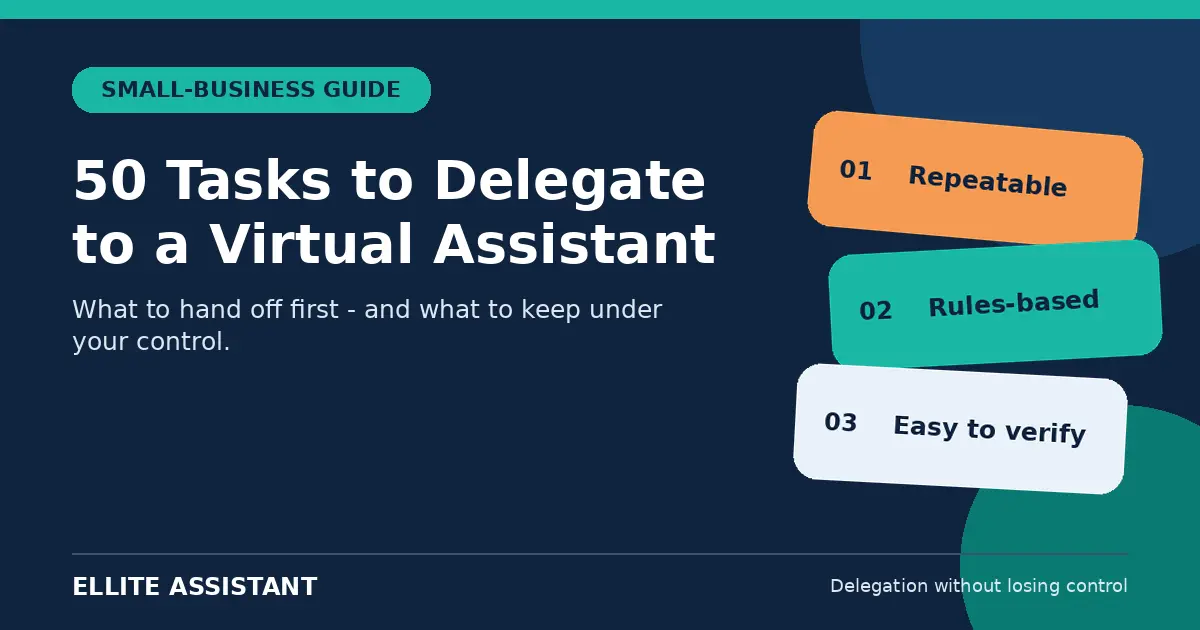
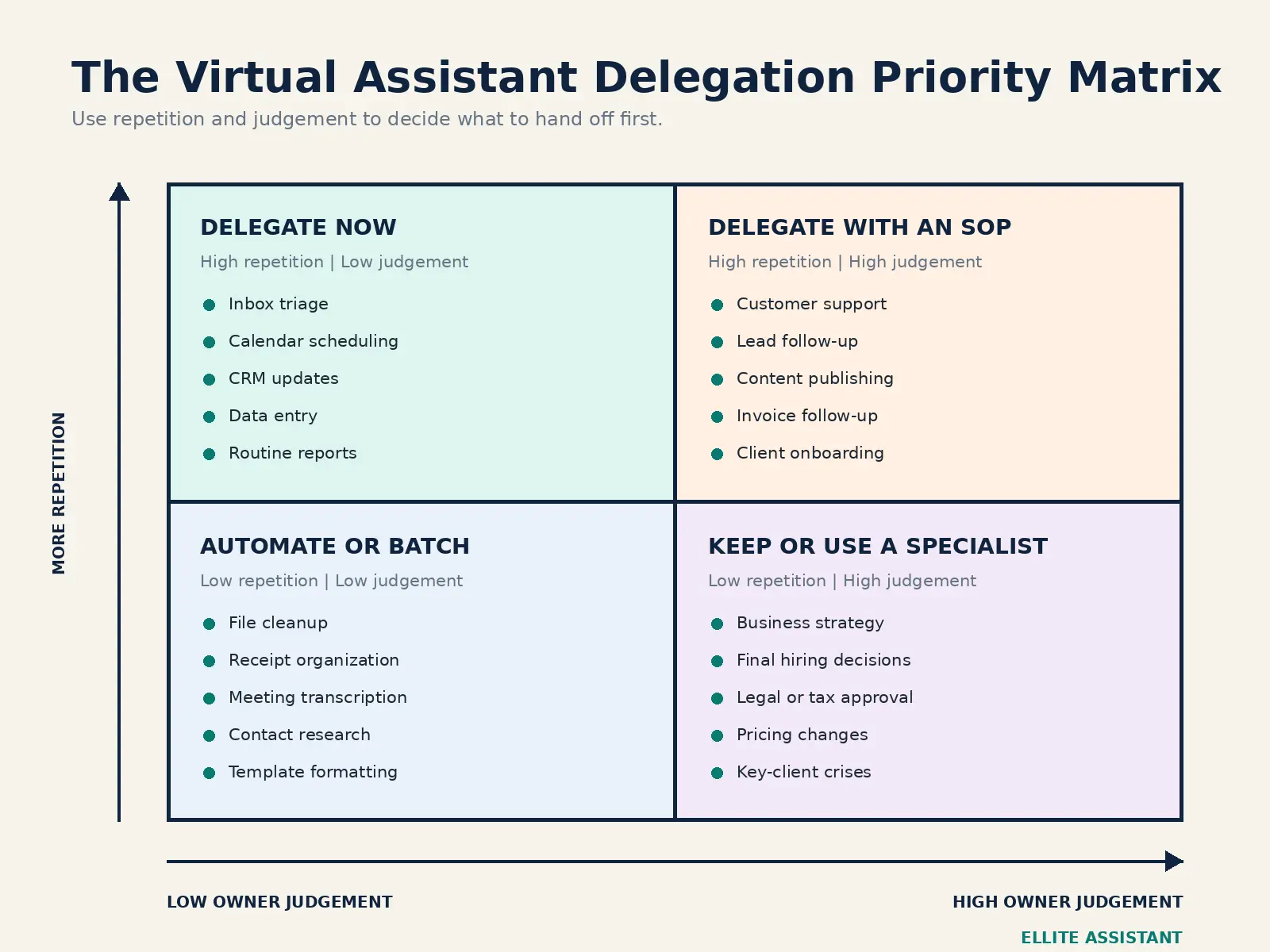
The best tasks to delegate to a virtual assistant are repeatable, rules-based, remote-friendly and easy to verify. For most small businesses, the first candidates are inbox triage, scheduling, CRM updates, data entry, routine customer questions, invoice follow-up and content scheduling.
Keep strategy, final legal and financial approvals, sensitive people decisions and high-stakes client conversations with the owner until clear controls and escalation rules are in place.
For more on what to outsource first, see What Every Entrepreneur Should Outsource First.
What Can a Virtual Assistant Actually Do?
A virtual assistant is a remote professional who supports a business with administrative, executive, customer-service, sales, marketing or operational work. The role can range from managing a calendar to maintaining a CRM or coordinating recurring business processes. The U.S. Chamber of Commerce similarly describes virtual assistants as remote workers who can handle administrative and executive tasks as well as specialized work such as research and website administration.
The better question is not whether a task can be performed remotely. It is whether the task can be handed off with a clear outcome, appropriate access and a reliable quality check.
Source: U.S. Chamber of Commerce: A Small Business Owner's Guide to Hiring Virtual Assistants
For more on when to hire, see Hire Virtual Assistant for Small Business.
Use the DELEGATE Test Before You Hand Off a Task
Score each statement as 1 for yes or 0 for no. A task scoring 6 to 8 is usually ready to delegate. A score of 4 or 5 means the task needs a stronger SOP, a smaller pilot or tighter approval limits. A score of 0 to 3 usually means the owner should keep it for now or give it to a qualified specialist.
| Letter | Test | Question |
|---|---|---|
| D | Documentable | Can the steps, examples or decision rules be explained? |
| E | Easy to verify | Can quality be checked without doing the task again? |
| L | Low owner judgement | Can most cases be handled without the owner's personal judgement? |
| E | Executed digitally | Can the work be completed through secure online tools? |
| G | Given frequently | Does it happen often enough to justify a repeatable handoff? |
| A | Access controllable | Can you limit access to only what the task requires? |
| T | Time-consuming | Does it take time away from sales, strategy or client delivery? |
| E | Economically sensible | Is the value of reclaimed time greater than the cost of support? |
Use this test alongside our Automate, Delegate or Do It Yourself framework to decide what truly belongs on your VA's plate.
50 Tasks to Delegate to a Virtual Assistant
Use this list as a menu, not a job description. Select tasks that share a workflow, toolset or outcome so your assistant can build context and consistency.
Administrative and Executive Support
- Inbox triage. Sort messages by priority, remove noise, label follow-ups and prepare draft replies within agreed rules.
- Calendar management. Schedule meetings, protect focus time, prevent conflicts and send reminders.
- Meeting preparation. Build agendas, collect documents, confirm attendees and prepare briefing notes.
- Meeting notes and action items. Turn recordings or notes into decisions, owners and deadlines.
- Travel research and booking support. Compare options, prepare itineraries and organize confirmations for approval.
- Document formatting. Create polished proposals, presentations, reports and reusable templates.
- Data entry. Move information into spreadsheets, databases or business systems with validation checks.
- File and folder organization. Apply naming rules, archive old material and keep shared drives searchable.
- Online research. Collect sources, compare vendors or summarize a defined question with links.
- Recurring reports. Compile weekly activity, pipeline, support or operational dashboards from approved data.
If you’re spending more than 10 hours a week on inbox management, calendar coordination and travel planning, it may be time to delegate. Hire an Executive Assistant to reclaim 15–20 hours per month and focus on strategic growth.
Customer Service and Client Experience
- Shared inbox monitoring. Acknowledge messages, categorize requests and route exceptions to the right person.
- Frequently asked questions. Respond from an approved knowledge base while escalating unusual or sensitive cases.
- Appointment confirmations. Reduce missed meetings with confirmations, reminders and rescheduling support.
- Client onboarding coordination. Send welcome materials, collect information and track every onboarding step.
- Status updates. Provide routine progress updates from your project system using approved language.
- Feedback collection. Send surveys, organize responses and flag recurring themes for review.
- Testimonial requests. Ask satisfied clients for feedback at the right moment and track permission to publish it.
For businesses handling high volumes of customer queries, order tracking and complaint resolution, a dedicated support VA can improve response times and customer satisfaction. Explore our Customer Support Virtual Assistant service for scalable, trained support.
Sales and CRM Support
- CRM data cleanup. Remove duplicates, standardize fields and complete missing contact information.
- New lead entry. Add enquiries quickly, tag the source and assign the next action.
- Lead research. Verify company details and add relevant context before outreach.
- Follow-up reminders. Monitor due dates so warm opportunities do not disappear in the pipeline.
- Approved outreach support. Personalize and send messages from approved templates to a defined, compliant list.
- Proposal coordination. Prepare standard sections, gather attachments and track viewing or signature status.
- Pipeline reporting. Summarize stage movement, ageing opportunities and follow-up gaps each week.
For a deeper look at how this can impact revenue, see How a Virtual Assistant Can Improve Lead Follow-Up.
Lead research, CRM updates and follow-up sequences are time-consuming but critical for revenue growth. Our Sales and Lead Generation VA service can implement your outreach strategy while you focus on closing deals.
Marketing and Content Operations
- Content scheduling. Load approved posts into the correct channels and check formatting before publication.
- Content repurposing. Turn one approved article, video or webinar into short posts, email snippets and summaries.
- Blog formatting. Apply headings, internal links, image alt text and consistent layout in the CMS.
- Newsletter production. Format approved copy, test links and schedule campaigns to the correct segment.
- Comment and message triage. Surface sales opportunities, support issues and reputational risks for the owner.
- Basic design production. Resize approved templates for social posts, thumbnails and simple documents.
- Content calendar maintenance. Track topics, owners, assets, status and publish dates in one place.
- Performance data collection. Compile approved metrics so the marketer or owner can interpret results.
Finance and Bookkeeping Administration
- Receipt organization. Collect, name and attach receipts to the appropriate transaction or folder.
- Invoice preparation. Create draft invoices from approved rates, milestones and client details.
- Payment reminders. Send courteous reminders according to an agreed schedule and escalate disputes.
- Expense categorization support. Prepare routine categories for review by the owner or bookkeeper.
- Accounts-payable tracking. Maintain due dates and prepare a payment list without authorizing fund transfers.
- Monthly document preparation. Gather statements and records for the qualified bookkeeper or accountant.
For sensitive financial workflows like invoice processing, receipt management and reconciliation, you need a VA with both technical skills and security awareness. Our Bookkeeping Virtual Assistant service combines secure access controls with experienced financial support.
E-commerce and Operations
- Order-status support. Answer routine order questions from current system information.
- Product-data updates. Maintain approved titles, descriptions, images, prices and inventory fields.
- Returns coordination. Apply the published return policy and escalate exceptions.
- Vendor follow-up. Request updates, collect documents and track agreed delivery dates.
- Inventory reporting. Compile low-stock, slow-moving or exception lists for decision-makers.
- SOP maintenance. Update process documents when approved steps, screenshots or tools change.
Recruitment and Team Administration
- Job-post formatting. Publish an approved role description in the correct channels.
- Applicant coordination. Confirm receipt, request missing information and schedule interviews.
- Candidate-data organization. Keep applications, notes and status fields complete and access-controlled.
- Reference-check scheduling. Coordinate calls and organize completed forms for the hiring manager.
- New-hire administration. Collect approved documents and coordinate account or equipment requests.
- Training-log maintenance. Track completed modules, due dates and acknowledgements without making employment decisions.
For more ideas on scaling without adding full-time staff, see How to Scale a Business Without Hiring Full-Time Staff.
What Should You Not Delegate to a Virtual Assistant?
Delegation should increase capacity without removing accountability. Keep these decisions with the owner or a qualified professional unless strict controls and approval limits are established.
- Business vision and strategic priorities: Your assistant can prepare data and options, but the direction belongs to leadership.
- Final legal, tax or regulatory decisions: Use a properly qualified professional and retain final approval.
- Unrestricted banking or payment authority: A VA may prepare information, but payments should require controlled authorization.
- Final hiring, firing or disciplinary decisions: Administrative coordination can be delegated; accountability cannot.
- High-stakes client or employee conflict: A VA can document and schedule, while the responsible leader handles the conversation.
- Uncontrolled access to every system: Grant only the minimum access required and review permissions regularly.
- A broken process: If the owner cannot define the desired outcome or rules, simplify the process before handing it off.
The One-Page Virtual Assistant Handoff Template
A task is not ready because it appears on a to-do list. It is ready when the person receiving it knows the outcome, normal steps, decision limits and escalation path.
| Field | What to define |
|---|---|
| Outcome | What should be true when the task is finished? |
| Trigger | What starts the task, and how often does it happen? |
| Inputs | Which files, systems or details are required? |
| Steps | What is the normal sequence? Add a short screen recording if useful. |
| Decision limits | What can the VA decide, approve or change without asking? |
| Quality check | How will accuracy, tone or completeness be verified? |
| Deadline | When should it be completed, and what is the expected response time? |
| Escalation | Which exceptions require the owner, and how quickly? |
Example: Inbox Triage
Outcome: Important messages are visible by 10:00 a.m.; routine requests receive approved replies; nothing urgent waits unnoticed.
Decision limits: The VA may label, archive and draft replies. Refunds, legal questions, complaints and commitments above an agreed amount are escalated.
Quality check: Review a daily exception log for the first week, then move to a weekly sample once accuracy is stable.
A Seven-Day Plan for Delegating Your First Two Tasks
| Day | Action | What to do |
|---|---|---|
| Day 1 | Audit | Track every recurring task you touch and estimate its weekly time. |
| Day 2 | Choose | Score the list with the DELEGATE Test and select two low-risk tasks. |
| Day 3 | Document | Create a one-page handoff brief and one example of a correct result. |
| Day 4 | Secure | Create individual access, enable MFA and set the minimum permissions needed. |
| Day 5 | Pilot | Let the VA complete the tasks while keeping a short question and exception log. |
| Day 6 | Review | Check accuracy, speed and communication; improve the rules once. |
| Day 7 | Stabilize | Agree on the recurring schedule, scorecard and next task to delegate. |
For a complete walkthrough, see How to Hire a Virtual Assistant in 8 Steps.
How to Measure Whether Your VA Is Working
Measure the process, not online presence. Choose two or three metrics that show whether the delegated work is becoming more reliable:
- Turnaround time.
- Accuracy or rework rate.
- Backlog size.
- Customer response time.
- Overdue follow-ups.
- Owner hours reclaimed.
- Exceptions requiring escalation.
Review the numbers weekly during the first month. If performance is weak, diagnose whether the issue is unclear instructions, insufficient access, the wrong person, or a process that still depends on unspoken owner knowledge.
Frequently Asked Questions
What tasks should I delegate to a virtual assistant first?
Start with recurring administrative work that has clear rules and low risk: inbox triage, scheduling, data entry, CRM updates, meeting preparation and routine follow-ups. A narrow, successful handoff builds confidence faster than assigning ten unrelated tasks at once.
How many hours of virtual assistant support should a small business start with?
Start with the workload, not an arbitrary number. Audit one week of tasks, total the time spent and choose a small recurring block that can be measured. Many businesses begin with one or two processes and add hours only after the handoff is stable.
Can a virtual assistant safely access business systems?
Yes, when access is managed correctly. Create named accounts, enable multi-factor authentication, grant the minimum permissions required, use an approved password manager and remove access promptly when it is no longer needed. Never send passwords through ordinary email or chat.
Can a virtual assistant handle bookkeeping?
A VA can support receipt collection, invoice preparation, payment reminders, document organization and routine data entry. Final accounting decisions, tax filings and regulated advice should remain with the owner and an appropriately qualified professional.
Should I hire a freelance VA or use a virtual assistant agency?
A freelancer can suit a business that wants a direct working relationship and is prepared to handle vetting, onboarding, management and backup coverage. An agency can suit an owner who values structured matching, supervision and continuity. Compare the full management burden, not only the hourly rate. For a detailed comparison, see Virtual Assistant vs Freelancer vs Agency.
How do I know whether delegation is working?
Choose two or three measures before the handoff: turnaround time, accuracy, backlog, response time, missed follow-ups, or owner time reclaimed. Review the scorecard weekly during the first month and adjust the process instead of relying on a vague feeling.
Ready to delegate your repetitive tasks?
Ellite Assistant provides dedicated virtual assistants for admin, executive support, customer service, sales, bookkeeping and real estate. Start with a 7-day trial for $49 and test 5 hours of focused support.
Hire a Virtual Assistant