Why Real Estate Teams Are Quietly Losing Deals to Slow Admin
Real estate teams lose deals when nobody owns the speed between lead capture, response, qualification, scheduling and follow-up. Leads wait in inboxes, CRM records lack next actions and showings go unconfirmed. This guide shows where deals quietly leak, how to install the CLOSE operating system and how a Virtual Assistant can own admin so agents can focus on advising, negotiating and closing.
Real estate teams rarely lose an opportunity with a dramatic warning.
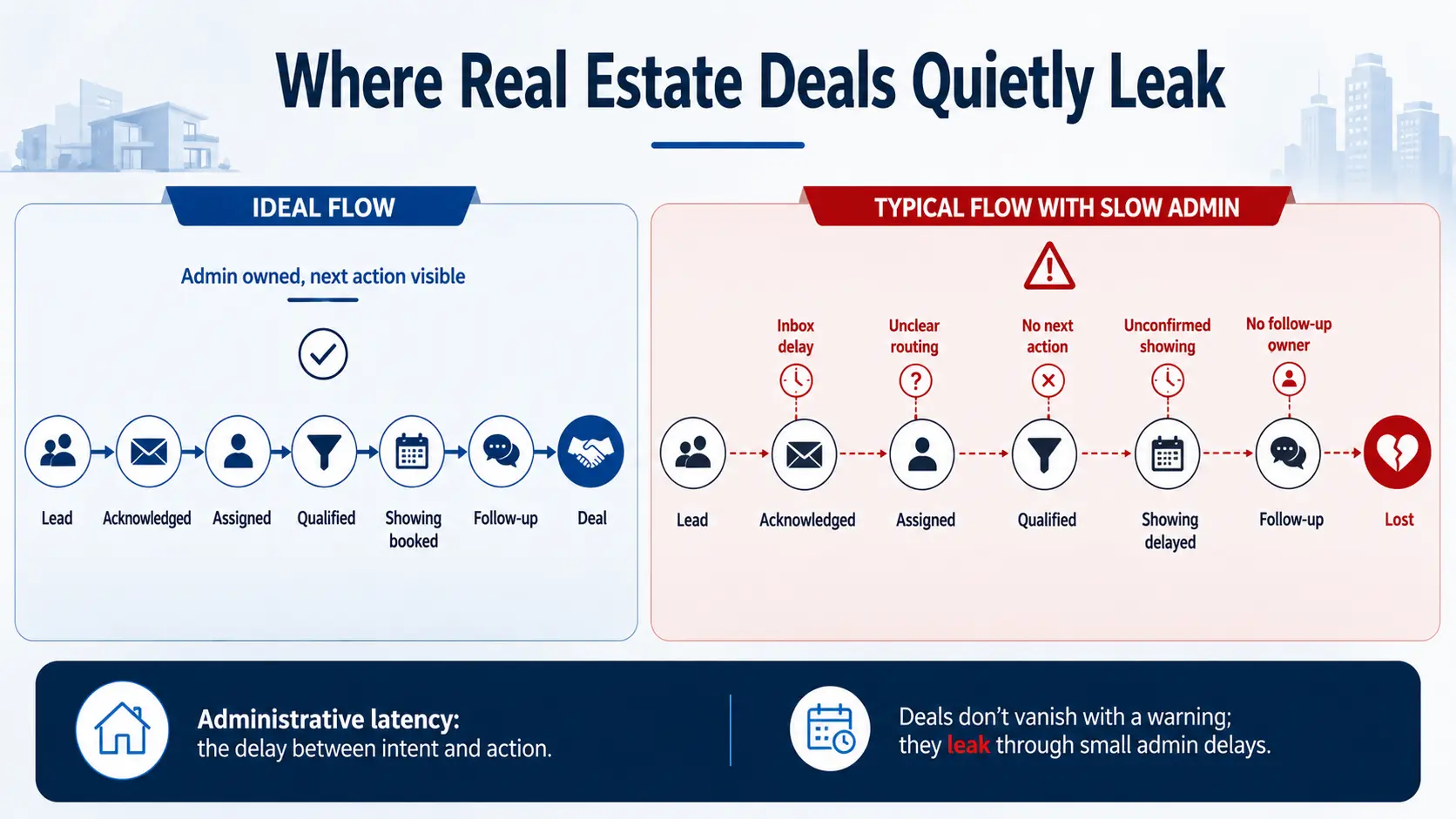
More often, the loss looks harmless: a portal enquiry waits in an inbox, a showing request remains unconfirmed, a CRM record has no next action, an open-house visitor is contacted two days later or a buyer receives a generic reply after already speaking with another agent.
The agent may never know a deal was available. The lead simply goes quiet.
This is administrative latency: the delay between a client's signal of intent and the team's useful next action. In a business where agents are driving, showing homes, negotiating and advising clients, that delay easily forms behind the scenes.
The short answer: Real estate teams lose deals when nobody owns the speed and accuracy between lead capture, response, qualification, scheduling and follow-up. A faster system does not require agents to live on their phones; it requires a defined administrative owner, response rules and a visible next action for every opportunity.
Responsiveness Is Part of the Real Estate Service
The agent remains central to the client experience. The National Association of REALTORS® reported that 88% of buyers purchased through an agent or broker in its 2025 buyer and seller profile, while 91% of sellers used an agent. Buyers relied on agents for finding the right home, negotiating and navigating paperwork. (NAR 2025 Profile)
But expertise matters only after contact is made.
Realtor.com's March 2026 guidance says modern buyers expect acknowledgement within minutes, are often comparing several properties and may contact more than one agent. It also warns that speed without clarity is not enough: the first response must help the buyer understand what happens next. (Realtor.com PRO)
Zillow's real estate lead-conversion guidance likewise recommends establishing contact as quickly as possible, then maintaining a structured sequence across phone, email and text during the first ten days. (Zillow Lead Conversion Plan)
The operational lesson is straightforward: the first response is not one task. It is the beginning of a managed sequence.
Why Busy Agents Cannot Solve This With More Effort
An agent's highest-value work often makes them least available for administration.
During a listing appointment, they should focus on the seller. During a showing, they should observe the buyer's reactions. During negotiation, they should not be sorting duplicate leads or rebuilding a missing CRM record.
Telling agents to "respond faster" without changing the workflow creates three problems:
- Important work competes with live client service.
- Response quality varies according to how busy the agent is.
- Nobody watches the queue when every agent assumes someone else will.
This is a capacity-design problem, not necessarily a motivation problem.
NAR's 2025 technology survey reflects the same tension: 66% of REALTORS® said saving time was a primary reason for adopting technology, and 64% cited improving the client experience. CRM systems were also identified as a lead-generating technology. (NAR REALTOR® Technology Survey)
Technology can route and remind. A human operator still needs to keep the data usable, recognise exceptions and ensure the next step occurs.
The Six Places Deals Quietly Leak

1. Lead capture
Enquiries arrive through portals, the website, social media, calls, texts, open houses, referrals and listing agents. If these sources do not feed one visible queue, some opportunities will be noticed late or not at all.
Common symptoms include:
- Leads forwarded manually between inboxes.
- No timestamp for the original enquiry.
- Duplicate records under different names.
- Calls recorded but not connected to the CRM.
- Open-house sheets waiting to be entered.
- No coverage outside an individual agent's availability.
2. Routing
Capturing a lead is not the same as assigning it. Teams lose time when the routing rule is unclear: by postcode, listing owner, availability, price range, rotation or relationship history?
A lead can sit untouched while several people privately ask, "Who has this?"
3. First acknowledgement
A fast acknowledgement should confirm receipt, identify the responsible person and make the next step easy. It should not pretend that a property question has been answered when the facts have not been checked.
The administrative job is to move the enquiry from uncertainty to a clear handoff. The agent can then provide the advice and market context that requires their expertise.
4. Qualification and CRM hygiene
A contact record without useful context becomes future admin.
The team should be able to see, where appropriate:
- Buyer, seller, landlord, tenant or referral status.
- Property or area of interest.
- Timeframe.
- Preferred contact channel.
- Financing or readiness information supplied by the prospect.
- Assigned agent.
- Last meaningful contact.
- Next action and due time.
- Consent or communication restrictions.
When these fields are incomplete, every follow-up begins with detective work.
5. Showing and appointment coordination
Scheduling delays create friction for the prospect and wasted capacity for the team. Common failure points include unconfirmed times, missing access instructions, time-zone mistakes, no reminder, changes that reach only one participant and calendars that do not reflect travel time.
The agent should not discover the problem while standing outside the property.
6. Follow-up and handoff

Many opportunities do not convert on the first exchange. A buyer may be waiting for financing, comparing neighbourhoods or pausing for several months. A seller may need time before listing.
Without a structured follow-up plan, these leads are either contacted too aggressively or forgotten entirely. The same problem appears after viewings: notes remain on a phone, feedback is not recorded and the next conversation has no owner.
The follow-up should add value and reflect the prospect's stage—not merely ask whether they are "still interested."
Why the Loss Is So Difficult to See
Slow admin rarely appears in the profit-and-loss statement as a separate cost.
The lead remains in the database
A stale contact still looks like pipeline volume. Unless the team measures age and next actions, a database can appear healthy while opportunities quietly decay.
Activity hides delay
Agents may report many calls, emails and showings. High activity does not reveal that new enquiries waited too long or that follow-up stopped after one attempt.
The prospect rarely explains
Most people do not write, "I chose another agent because your handoff was slow." They simply reply elsewhere—or stop replying.
The systems show fragments
One tool contains the enquiry, another the appointment, another the message history and another the transaction record. No single view shows the time lost between them.
Each failure looks small
One missed call, one incomplete record or one unconfirmed showing appears recoverable. The commercial impact comes from repetition across weeks and agents.
Install the CLOSE Operating System
The answer is not a more complicated CRM. It is a clear operating discipline. Use the CLOSE framework.
C — Capture every enquiry
Create one monitored queue or reporting view across approved lead sources. Record the original source and time. Reconcile imports so portal, website and offline leads do not disappear between systems.
L — Label the context
Add the minimum information needed to route and respond intelligently: lead type, property or area, timeframe, preferred channel and any restrictions already known.
Do not force the lead to repeat information they have already provided.
O — Own the next action
Every live opportunity needs one named owner and one dated next step. "In CRM" is not a status. "Agent to call after lender conversation on Thursday" is.
S — Schedule the sequence
Create an approved cadence appropriate to the lead source and stage. Include contact attempts, appointment confirmations, post-showing follow-up and long-term nurture. Stop or change the sequence when a reply, opt-out, dispute or other exception occurs.
E — Expose and escalate delay
Use a daily exception view for:
- Unassigned new leads.
- Enquiries beyond the response target.
- Appointments awaiting confirmation.
- Records missing a next action.
- Overdue follow-ups.
- Duplicate or conflicting records.
- Replies requiring agent judgment.
The purpose is not to punish agents. It is to make invisible delay actionable.
What Agents Should Own—and What Admin Support Can Own
| Workflow | Agent or licensed professional | Trained administrative support |
|---|---|---|
| Client advice | Market interpretation, recommendations and strategy | Prepare verified background information and organise questions |
| Lead response | Personal consultation and relationship-building | Monitor queue, acknowledge within approved rules and route promptly |
| Qualification | Apply brokerage policy and licensed judgment where required | Record information supplied by the prospect and flag missing fields |
| Showings | Conduct the showing and advise the client | Coordinate availability, confirmations, reminders and access details |
| Negotiation | Pricing, terms, offers and negotiation | Maintain task visibility and assemble approved documents for review |
| Follow-up | High-value conversation and advice | Maintain cadence, prepare context and ensure the next action is recorded |
| Reporting | Decide priorities and coaching actions | Produce response-time, ageing and exception reports |
Licensing rules vary by state and jurisdiction. Administrative support must remain within the brokerage's permitted scope and should not provide regulated advice, negotiate or perform activities reserved for licensed professionals.
Where a Real Estate Virtual Assistant Fits

A real estate Virtual Assistant can provide the persistent operational attention that agents cannot maintain while serving clients.
Depending on the approved scope, a VA can:
- Monitor portal and website enquiries.
- Enter, deduplicate and update CRM records.
- Route new leads according to team rules.
- Send approved acknowledgements.
- Research property or contact information from approved sources.
- Coordinate calendars, viewings and reminders.
- Maintain follow-up tasks and nurture queues.
- Prepare daily exception and weekly pipeline reports.
- Chase internal updates so records remain current.
- Document recurring workflow problems.
AI can help the VA summarise threads, draft messages and categorise records. The VA should verify the source, apply the brokerage's rules and remain accountable for the next action. Automation moves the item; a human handles the exception.
The Metrics That Reveal Administrative Latency
Start with a small dashboard:
- Median time from enquiry to acknowledgement.
- Time from capture to assigned agent.
- Percentage of new leads with a named next action.
- Unassigned enquiries by age.
- Overdue follow-ups.
- Appointments awaiting confirmation.
- Duplicate rate.
- Percentage of records with required qualification fields.
- Lead ageing by stage and source.
- Conversion by source, team or response-time band.
Use the numbers to improve routing, coverage and follow-up—not to encourage rushed, low-quality messages. A fast generic reply that creates no useful next step is still weak service.
Run a Seven-Day Admin Speed Audit
Day 1: Map every lead source
List where enquiries arrive and who currently watches each channel.
Day 2: Sample recent opportunities
Choose a manageable set and record capture time, first acknowledgement, assignment, next action and current status.
Day 3: Trace the handoffs
Identify where an agent, administrator, portal, inbox or CRM waited for another part of the system.
Day 4: Review appointment friction
Check pending confirmations, reminders, reschedules, access notes and follow-up after showings.
Day 5: Find the top three leakage points
Prioritise repeated problems with a clear client or revenue consequence.
Day 6: Build one controlled workflow
Define the queue owner, response target, required fields, approval point, next-action rule and escalation path.
Day 7: Measure and decide
Compare the pilot with the baseline and decide what to expand, change or stop.
Ellite Assistant's $49 trial provides five hours of dedicated support over seven days. A real estate team can use those hours to audit one lead queue, clean a defined CRM segment or establish one showing-follow-up workflow.
Run your seven-day admin speed audit with dedicated support
Use five hours of focused assistance to map one lead queue, clean a CRM segment or establish one showing-follow-up workflow.
Start the $49 Virtual Assistant Trial Book a consultationFrequently Asked Questions
How fast should a real estate team respond to a new lead?
Current consumer guidance emphasises acknowledgement within minutes, but the appropriate service target depends on lead source, operating hours, coverage and brokerage policy. Measure your actual performance and define a target the team can sustain without sacrificing accuracy.
Can an automated message solve slow response?
It can confirm receipt and set expectations. It does not replace qualification, routing, accurate answers or follow-through. Every automated acknowledgement should create a visible human next action.
What is the most important CRM field?
For daily execution, the most commonly missing field is often the next action with an owner and due time. A large contact record without that field does not tell the team what to do.
Can a Virtual Assistant speak with buyers and sellers?
Potentially, within the approved administrative scope and applicable brokerage and licensing rules. The VA should not provide advice, negotiate or perform work reserved for licensed professionals.
Should the VA work inside our existing CRM?
Usually, yes. The goal is to improve the team's system of record rather than create a separate shadow database. Grant only the access needed for the assigned scope.
How does AI help a real estate VA?
AI can accelerate drafting, summarisation, categorisation and research organisation. A trained person still needs to verify the output, protect client information, apply team rules and close the operational loop.
Which workflow should we fix first?
Start where client intent is highest and delay is easiest to observe—often new portal enquiries, website leads, open-house follow-up or unconfirmed showing requests.
The Bottom Line
Real estate teams do not need agents to become faster administrators. They need an operating system that protects the moments when buyer or seller intent is highest.
Capture every enquiry. Label the context. Own the next action. Schedule the follow-up. Expose delay before the prospect disappears.
When trained administrative support keeps that system moving, agents can spend more time on the work clients hired them to do: advise, negotiate, show, communicate and close.
If you want to identify where your team is losing time between enquiry and action, book a conversation with Ellite Assistant or start the $49 trial.
Editorial note: This article provides general operational guidance and is not legal, licensing or brokerage-compliance advice. Permitted administrative activities vary by jurisdiction, brokerage policy and service scope.
Why do real estate teams lose deals to slow admin?
- How fast should a real estate team respond to a new lead?
- Can an automated message solve slow response?
- What is the most important CRM field for real estate leads?
- Can a Virtual Assistant speak with buyers and sellers?
- Which workflow should a real estate team fix first?